WordPress Development
Why WordPress Agencies Are Replacing Typeform With a Native Intake Portal
At some point, every WordPress agency reaches for Typeform.
The situation is always the same. You need to build a serious multi-step intake form for a client — a law firm onboarding portal, an accountant’s document collection form, a service agency’s new client questionnaire. You know from experience that Gravity Forms or WPForms will require two days of CSS fights before it looks acceptable. So you reach for Typeform instead. It’s polished. It works. You embed it in an iframe, call it done, and move on.
It feels like the smart move. It isn’t. And the costs don’t show up until later.
The Typeform Tax
Typeform’s monthly fee starts at $25 and climbs quickly once you need features like file uploads, custom branding, or more than a handful of responses per month. That bill is recurring, and it’s your client’s problem — which means it’s your agency’s problem when the client calls to ask why they’re paying for “another subscription.”
But the monthly fee is the smallest part of the Typeform tax. The real costs are structural.
Your client’s data leaves WordPress. Every form response — names, contact details, uploaded documents, case summaries — is stored on Typeform’s servers, not in the client’s WordPress database. For law firms, accounting practices, and HR teams, this is not a minor inconvenience. It’s a compliance question. Where is our client data stored? Who has access to it? How do we export it if we cancel? These are questions you don’t want to answer from a support ticket.
The iframe breaks things your client cares about. Typeform embeds inside an iframe. Iframes are technically isolated — that’s why the CSS looks correct — but they come with a different set of problems. Dynamic height resizing on mobile is unreliable. The form’s domain is not your client’s domain, which creates trust signals a law firm or accountant cannot afford to ignore. Conversion tracking breaks. Analytics fragment across two separate domains. Accessibility fails. None of these problems are visible at launch. They surface three months later when the client asks why their intake form has a 40% drop-off rate on mobile.
Your client has to manage two platforms. Submissions land in Typeform’s inbox, not in WordPress. Your client now has to check two places: their email, and a third-party dashboard they didn’t ask for. If they want to assign submissions to team members, change statuses, or keep notes on a case, they’re doing it in Typeform — outside the WordPress environment where the rest of their operations live.
Why the Real Problem Is the WordPress Plugin Architecture
The reason agencies reach for Typeform in the first place is not that Typeform is great. It’s that the standard WordPress form plugin alternatives are structurally broken for complex portals.
Gravity Forms, WPForms, Fluent Forms — these plugins render their HTML directly inside the theme’s DOM. Every CSS rule your theme defines, every override your page builder injects, every reset your child theme applies: all of it reaches the form. You can’t prevent it. The form’s HTML has no boundary to protect it.
The result is a CSS specificity war that consumes hours of developer time on every project, and needs to be re-fought every time the client updates their theme. Agencies reach for Typeform because they’ve learned, through experience, that embedding an iframe is the only way to get reliable CSS isolation inside WordPress.
The real fix is not to abandon WordPress. It’s to fix the isolation problem without abandoning the site.
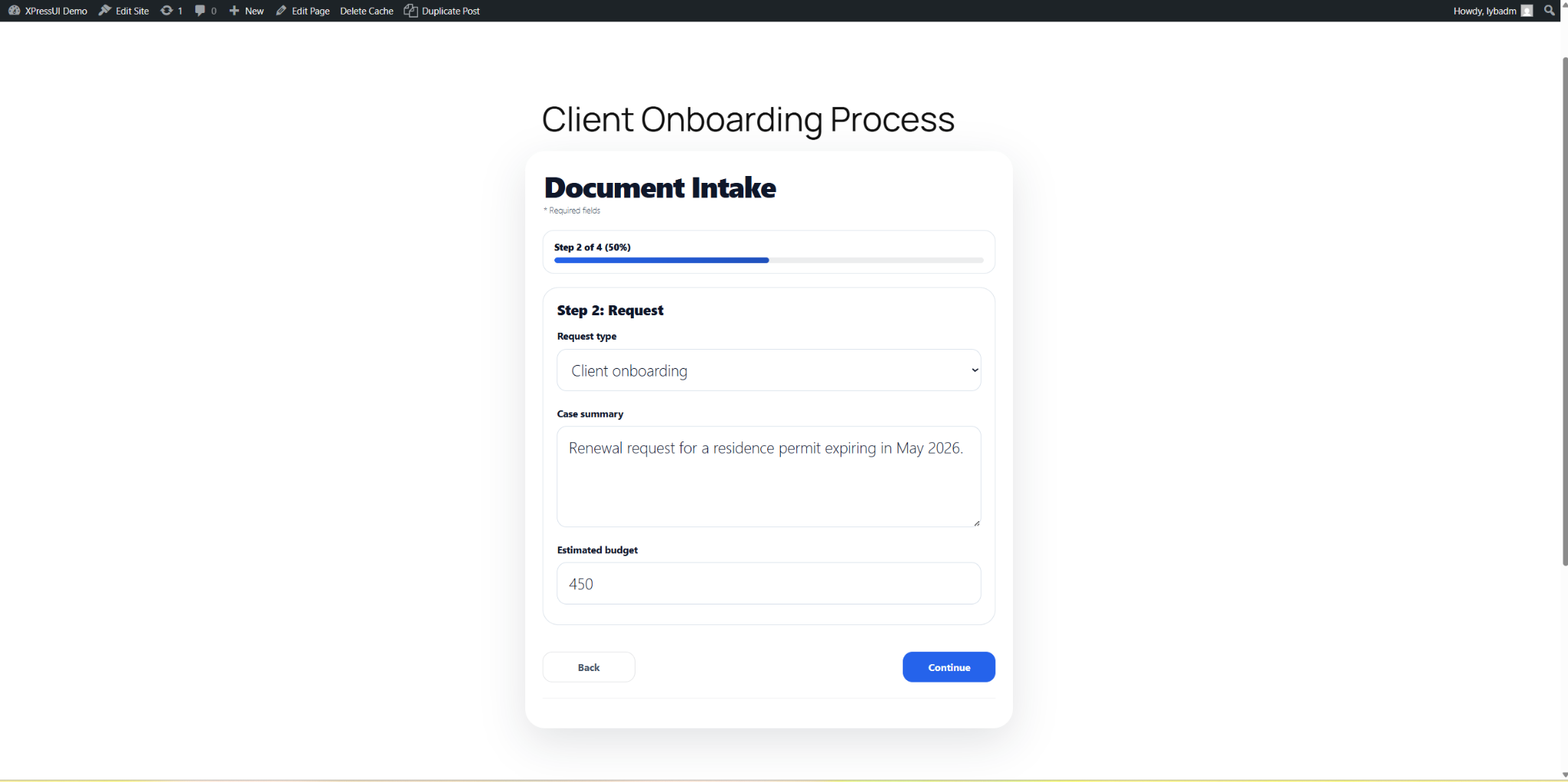
[xpressui id="client-intake"]. Native DOM, strictly scoped CSS, zero theme conflicts.What Native CSS Isolation Actually Looks Like
The CSS isolation that makes Typeform’s iframe look clean can be replicated natively inside the WordPress page — without an iframe, without a third-party host, without data leaving the site.
The technique is strict CSS scoping: every CSS rule the form uses is prefixed with a unique wrapper ID, for example #xpressui-root-client-intake. The theme’s global input { border: none; } cannot penetrate that prefix. The form’s button styles cannot leak out to the rest of the page. The isolation is complete.
This is exactly how XPressUI works. The form renders inline in the page — native DOM, no iframe — but is entirely isolated from the theme. You can activate the most aggressively styled theme in the WordPress ecosystem. Nothing breaks. There is no CSS to override, no !important tag to write, no late-night debugging session before launch.
The Submission Inbox That Stays in WordPress
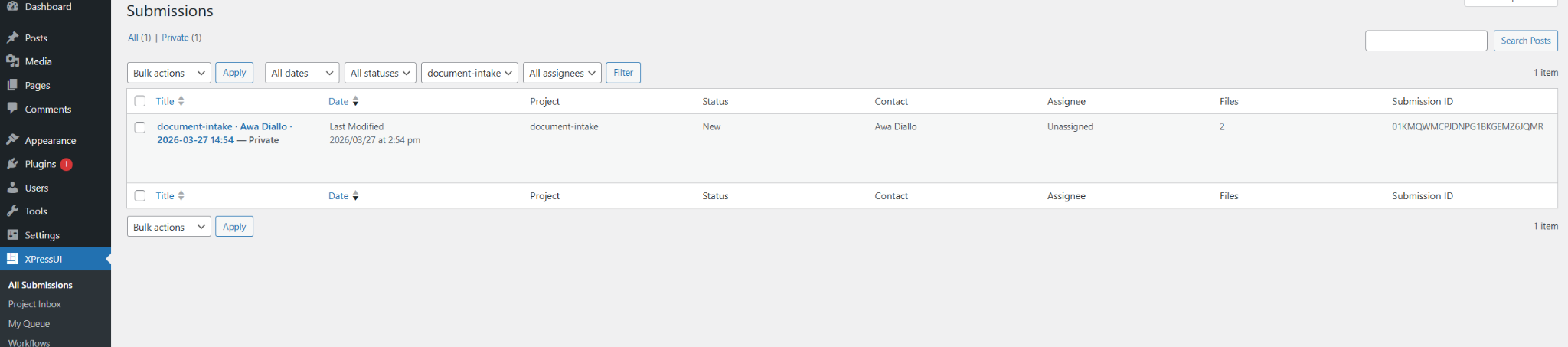
The other half of the Typeform replacement is where submissions land.
XPressUI stores every submission as a private post inside the WordPress database — visible only to authorized users in wp-admin, never sent to an external server. The submission detail view shows all field values, links to uploaded documents stored in the native WordPress Media Library, and a complete status history.
Your client gets a structured inbox with status badges (New, In review, Done), a filter by project or assignee, and a My Queue page that shows each team member their personal backlog. The entire intake workflow — from form submission to document review to case assignment — runs inside the WordPress dashboard they already use.
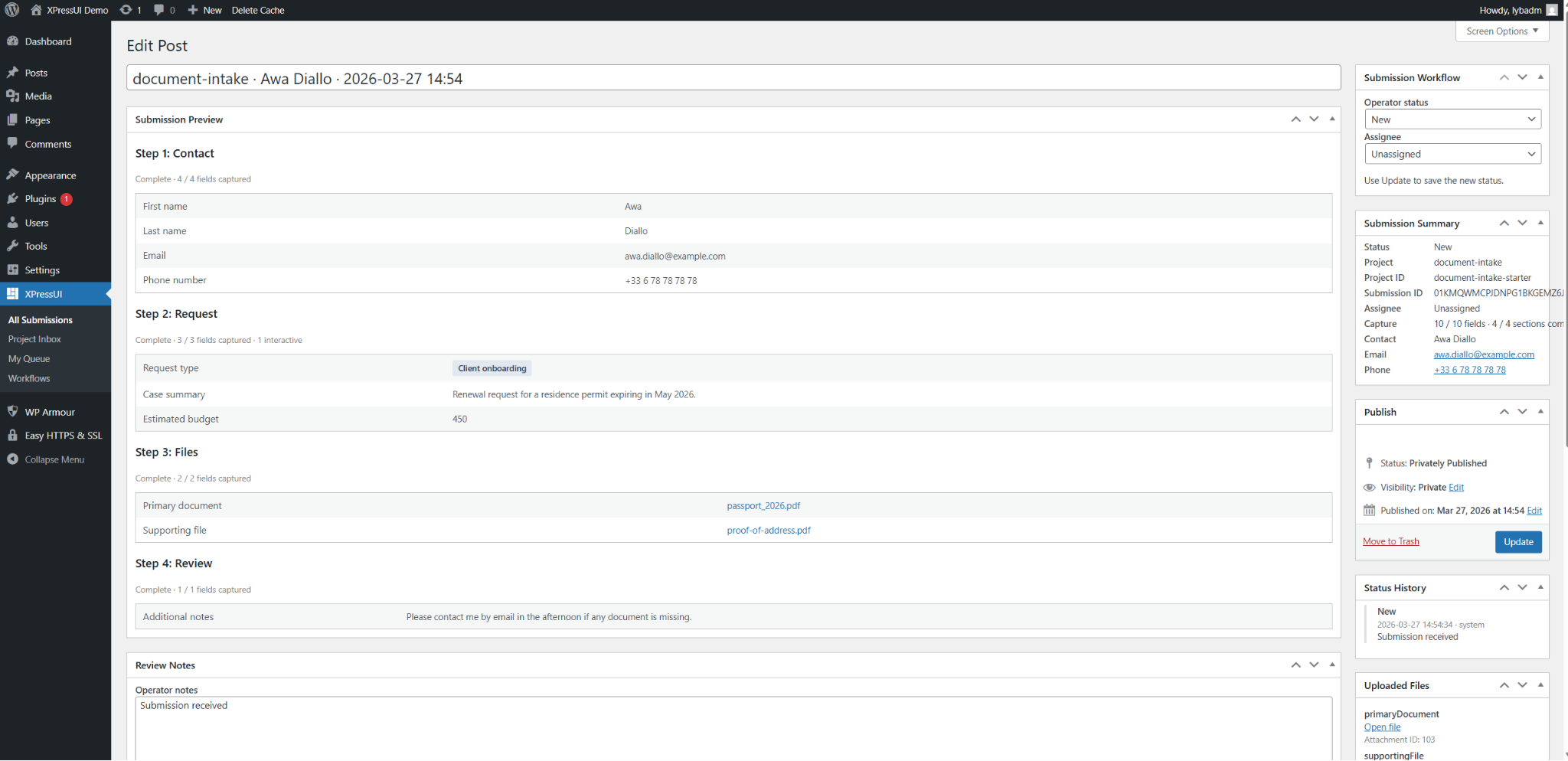
No second platform. No separate login. No data stored on a server your client doesn’t control.
The Installation Is Two Minutes
Replacing Typeform with XPressUI does not require rebuilding anything from scratch. The workflow:
- Install and activate the XPressUI WordPress Bridge plugin.
- In the XPressUI console, design your intake form — multi-step, conditional fields, file uploads — and export it as a
.zippackage. - Upload the package in wp-admin › Submissions › Manage Workflows.
- Add
[xpressui id="your-project-slug"]to any page or post. - Publish.
The form is live, isolated from the theme, storing submissions locally, sending notification emails via the client’s own mail server. There is no Typeform account to maintain. There is no external server handling the data. There is no monthly invoice for the client to question.
When Typeform Is Still the Right Choice
To be direct: Typeform is an excellent product for some use cases. If you need a quick standalone survey hosted on its own URL, with no WordPress integration required, Typeform is fast and polished.
But if the use case is a document intake portal, a client onboarding form, or a multi-step application — embedded in a WordPress site, with submissions that need to stay inside that site, managed by a team that works in wp-admin — then Typeform is a workaround, not a solution. It solves the CSS problem by removing the form from WordPress entirely, while creating a new set of problems around data residency, platform fragmentation, and ongoing cost.
XPressUI solves the CSS problem where it actually belongs: inside WordPress, at the architecture level, without sending a single byte of your client’s data to a third-party server.
→ See the live portal — the form is inline, theme-isolated, and every submission lands directly in wp-admin. Submit a test entry and check the inbox.
Keep your client data in WordPress. Keep your client’s data off Typeform’s servers.
Multi-step intake forms that render inline, look pixel-perfect on any theme, and store everything locally.
Ready to make peace with your themes?
See the decoupled architecture in action on our live demo — no signup required.